TOSHIBA Top PageJump to Main Text
 Contact us
 Site map
TOPPAGE
Product informationSupportTopicsApplicationMemberJapanese
  1. Top page
  2. Product information
  3. TOSVERT VF-S11 How to use

Product information

TOSVERT VF-S11 TOSVERT VF-S11: How to use Capacity range
1 phase 200V-0.2~2.2kW
3 phase 200V-0.4~15kW
3 phase 400V-0.4~15kW
3 phase 600V-0.75~15kW
1 phase 200V-0.2~2.2kW (IP54)
3 phase 400V-0.75~3.7kW (IP54)

[Open the carton box and trial run]

[Detaching the cover](How to open the front (terminal board) cover)
To wire the terminal board, remove the front lower cover in line with the steps given below.

Detaching the cover

Page top


[Connection of power supply and motor]
Please connect the power supply cable to R/L1, S/L2 and T/L3. (RED area)
Please connect the motor cable to U/T1, V/T2 and W/T3. (BLUE area)
- Regarding cable size and selection of wiring devices, please refer the list of 'Wiring device'.
Connection of power supply and motor

Page top


[Turning on the power supply]
When turning on the power supply, the VF-S11 indicates HALLO , first. After that, it changes 0.0 , automatically.

Page top


[Panel operation]
The default setting of VF-S11 series is operated by the operation panel.
- RUN and STOP by RUN/STOP keys
- Frequency setting by the potentiometer on operation panel

RUN and STOP

RUN and STOP

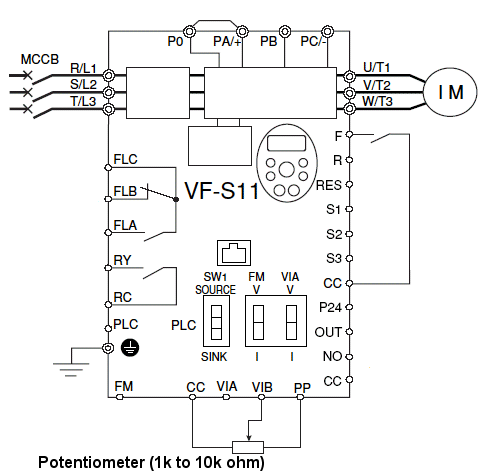
When you operate VF-S11 by external signals, please set the following parameter and connect the signals.
[Setting procedure]
Parameter setting procedure

[Connection(sink logic)]
Connection


[Steps for returning all parameters to standard default setting]
If you need parameter setting to default, please execute the following steps.
Steps for returning all parameters to standard default setting

Page Top